Decision Review / Public example
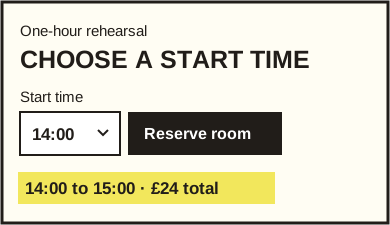
Show when the rehearsal ends.
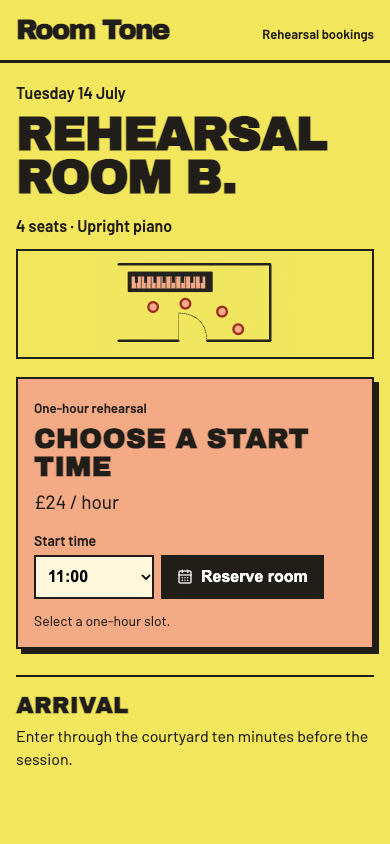
A musician needs to check the end time and total cost before reserving Room B.
Capture and sketch by Unvibed. Room Tone is an agent-built demo with fictional records. Original portfolio study.
Why this comes first
The ticket already identifies the room, the day and the hourly price. The musician can pick 11:00, but has to work out when to leave and what the session costs. Use the existing status line to answer those two questions while they can still change their choice.
Sketch of the change
Paste into your agent
On Room Tone’s reservation ticket, replace the idle status text below the time picker with the selected start and end times plus the total. Derive the end from the existing one-hour duration and the total from the existing £24 price. Update the line when the selection changes. Preserve the reservation handler, the disabled full slot and the existing confirmation message.
Acceptance check
1. At 390 × 844, open Room B. Before clicking Reserve room, expect “11:00 to 12:00 · £24 total”. 2. With the keyboard, choose 14:00. Expect “14:00 to 15:00 · £24 total”. The 09:00 full slot stays unavailable. 3. Confirm. Expect “Room B reserved at 14:00”. Change back to 11:00 and check that the time summary returns and the button is enabled. Repeat at 1440 × 900.